
On This Page
AI Agent vs Chatbot vs Workflow Automation: What Each One Actually Does
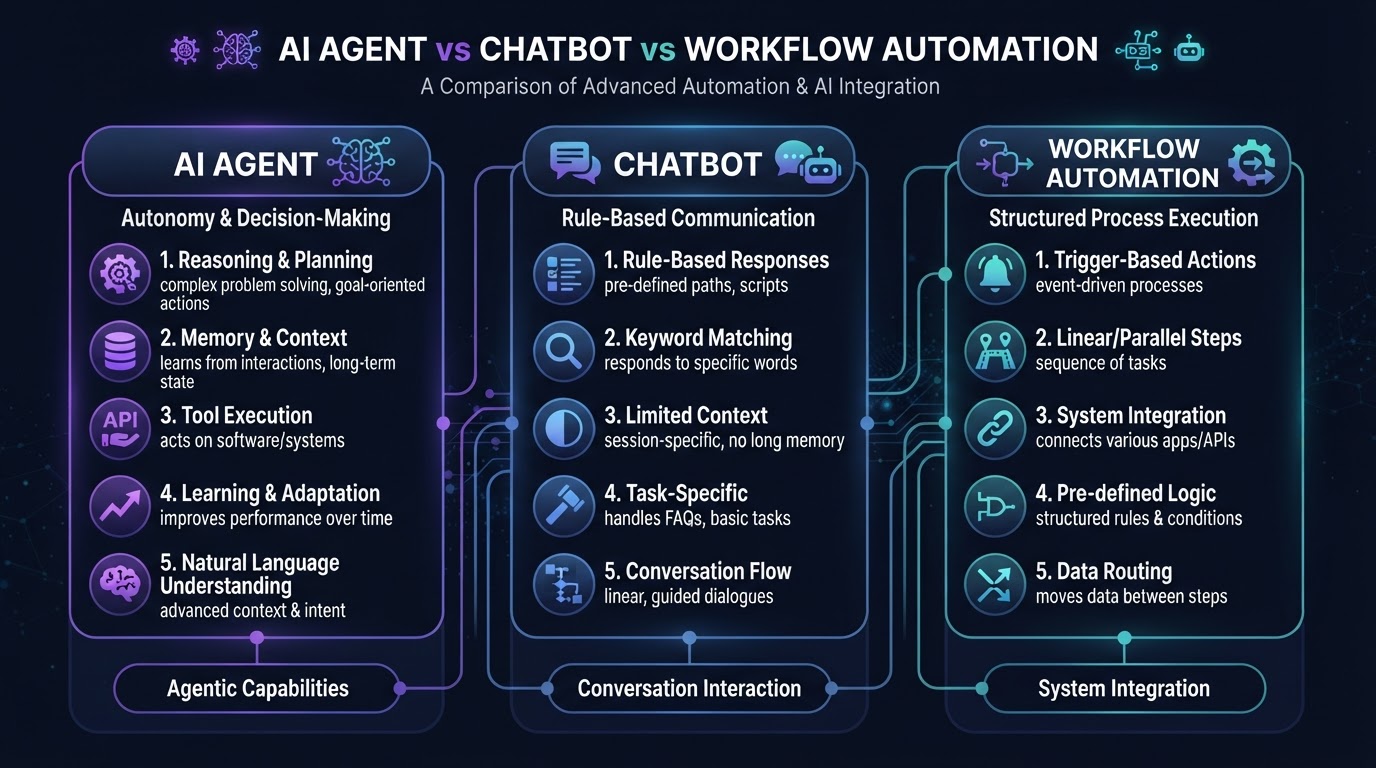
'AI agent,' 'chatbot,' and 'workflow automation' are used interchangeably by most vendors, and the confusion is costing businesses money. They're not the same thing, and choosing the wrong one for a given task either over-engineers a simple problem or under-delivers on a complex one. After building hundreds of automations across all three categories, the distinction is clear — and it's not about the technology, it's about what each is designed to do. This guide breaks down what AI agents, chatbots, and workflow automation each actually do, where they overlap, and how to match the right tool to each business problem so you're not paying for capabilities you don't need or missing capabilities you do.
01Workflow Automation: The Reliable Workhorse
Workflow automation is the foundation layer, and it's the one most businesses should start with. It's deterministic: when event A happens, do B, then C, then D, in that order, every time. No reasoning, no judgment, no improvisation — just reliable, repeatable execution. A form submission triggers CRM record creation, which triggers a confirmation email, which triggers a Slack notification. Every step is visible, testable, and predictable.
The strength of workflow automation is its reliability. Because it's deterministic, you can test it exhaustively, debug it precisely, and trust it to do exactly the same thing on the 10,000th execution as it did on the 1st. When it breaks, the failure is traceable — you can look at the logs and see exactly which step failed and why. This is why mission-critical processes (payment processing, compliance reporting, contract generation) should be workflow automation, not AI agents.
The limitation is flexibility. Workflow automation can't handle inputs it wasn't designed for. If a lead submits a form with an unexpected field, or asks a question the workflow wasn't built to answer, the workflow either ignores it or fails. That's where the next layer comes in. Tools like Zapier and Make are the dominant platforms for this layer — the Zapier vs Make comparison breaks down which is better for different workflow complexity levels. For most service businesses, workflow automation handles 70–80% of the automation needs, and it's the layer that delivers the most reliable ROI.
02Chatbots: The Conversational Interface
A chatbot is an interface, not a backend. Its job is to interact with a human through conversation — answering questions, collecting information, guiding users through a flow — and it can be powered by anything from simple rules to large language models. The defining characteristic is the interface: a conversational back-and-forth that replaces a form, a FAQ page, or a phone tree.
Modern chatbots powered by LLMs are dramatically more capable than the rule-based chatbots of five years ago. Instead of 'press 1 for sales, press 2 for support,' they understand natural language: 'I need help with my invoice' routes to billing; 'what are your hours?' routes to scheduling. They can answer questions from your knowledge base, qualify leads by asking the right questions, and even book appointments directly. This is the layer that AI chatbots and voice assistants service focuses on — conversational AI that handles customer-facing interaction.
The limitation is that a chatbot alone doesn't 'do' anything beyond the conversation. It can't update your CRM, send an invoice, or trigger a nurture sequence — unless it's connected to workflow automation. A chatbot without workflow automation is a receptionist who can't write anything down. The power comes from combining them: the chatbot collects and qualifies, the workflow acts. This is why the highest-converting setups connect a chatbot to a CRM via workflow automation, as we describe in our chatbot vs live chat analysis — the bot handles the conversation, the workflow handles the action.
Put AI to Work in Your Business
We design, build, and manage AI agents and automation that fit your workflow — done-for-you on a flexible monthly subscription.
03AI Agents: The Reasoning Layer
An AI agent is the newest and most powerful — and most misunderstood — of the three. Unlike workflow automation (which follows a predetermined path) or a chatbot (which converses), an agent receives a goal and decides for itself how to achieve it. You give it tools (search the CRM, send an email, create a task, look up a policy) and a goal ('follow up with every lead who visited the pricing page but didn't book'), and it plans and executes the sequence.
The power of agents is flexibility. A workflow that handles 90% of cases cleanly still leaves 10% requiring human cleanup — the edge cases, the unexpected inputs, the 'this doesn't match any template' situations. Agents close that gap by reasoning about the edge case instead of failing on it. If a lead asks a question the workflow wasn't designed for, the agent can search the knowledge base, draft a response in your brand voice, and send it — without a human in the loop.
The limitation is reliability. Because agents make their own decisions, they can also make their own mistakes — and those mistakes are harder to debug than a workflow failure. An agent that decides to send a follow-up email to the wrong lead, or that drafts a response with a hallucinated detail, creates a problem that's harder to trace than a workflow that simply failed at step 3. This is why agents should be deployed with guardrails: constrain the toolset (give the agent only the tools it needs, not every API you have), set clear success criteria, and log every decision so you can audit the reasoning chain. The automation monitoring best practices framework covers the monitoring layer that makes agents safe to deploy in production.
04How They Fit Together: The Three-Layer Stack
The most effective automation stacks use all three layers, each doing what it's best at:
- Workflow automation — deterministic data movement and CRM actions
- Chatbots — customer-facing conversation and qualification
- AI agents — edge cases that need reasoning and adaptation
They're connected: the chatbot hands off to the workflow, the workflow triggers the agent for complex cases, and the agent uses workflow tools to take action.
Consider a lead intake flow. A visitor lands on your site and the chatbot engages: 'Hi! What can I help you with today?' The visitor says they need a quote for a specific service. The chatbot qualifies (asks about timeline, budget, location) and hands off to workflow automation, which creates the CRM record, enriches the lead with company data, and triggers a nurture sequence. The lead asks a follow-up question the chatbot can't answer — 'Do you handle multi-location setups?' — and the AI agent steps in, searches your knowledge base, drafts a tailored response, and sends it. Three layers, one seamless experience.
The key to making this work is clear boundaries. The chatbot doesn't try to reason — it collects and routes. The workflow doesn't try to converse — it executes. The agent doesn't try to do everything — it handles the cases the other two can't. When the boundaries blur, you get the worst of all worlds: a chatbot that hallucinates, a workflow that tries to be smart and fails, and an agent that's too constrained to be useful. According to OpenAI's Agents SDK documentation, the most reliable agent deployments are the ones with the narrowest toolsets and the clearest success criteria — not the ones with the most capabilities.
05Which One Does Your Business Need?
The answer is almost always 'all three, in order.' Start with workflow automation. It delivers the most reliable ROI, it's the easiest to test and maintain, and it handles the majority of repetitive tasks. If you're just starting with automation, this is where to invest — automating lead intake, appointment reminders, and follow-up sequences with deterministic workflows. The business processes to automate before hiring guide identifies the specific processes that benefit most from this layer.
Add a chatbot when you need a conversational interface. If customers or leads are asking the same questions repeatedly, if your form abandonment rate is high, or if you need 24/7 coverage for common inquiries, a chatbot is the right addition. It sits on top of your workflows — the bot collects and qualifies, the workflow acts. This is the layer that most directly improves customer experience and conversion rate.
Add AI agents last, and only for edge cases. Agents are powerful but complex, and their value is in handling the 10% of cases that workflows and chatbots can't. If you're spending significant human time on exceptions — unusual lead questions, complex routing decisions, personalized follow-up drafting — an agent can close that gap. But don't start here; start with the reliable layers and add agents when you have a specific edge-case problem to solve. The AI automation agency cost guide covers the pricing of each layer so you can budget the stack in stages.
Key Takeaways
- Workflow automation is deterministic and reliable — the foundation layer for 70–80% of automation needs, including all mission-critical processes.
- Chatbots are a conversational interface that collects and qualifies — powerful when connected to workflow automation, limited when standalone.
- AI agents reason about edge cases — powerful but complex, best deployed last and only for the 10% of cases other layers can't handle.
- The most effective stack uses all three: chatbot for conversation, workflow for action, agent for edge cases — with clear boundaries between layers.
- Start with workflow automation (highest ROI), add a chatbot (better CX), and add agents last (edge-case handling) — build the stack in stages.
Frequently Asked Questions

Written by Moise
Founder & Lead Automation ArchitectMoise is the founder and lead automation architect at Wootomatic. With over a decade of hands-on experience designing, implementing, and maintaining high-throughput business automations, CRM pipelines, and custom AI agents, he has architected mission-critical workflows for hundreds of appointment-based and field-service businesses. His focus is on resilient, monitored systems that produce measurable ROI without fragile software bloat.
Put This Into Practice
We build and manage these automations for service businesses on a flexible monthly subscription. Explore the related service to see how it works:


