
On This Page
Missed-Call Text-Back Automation: How It Works and What It Should Include
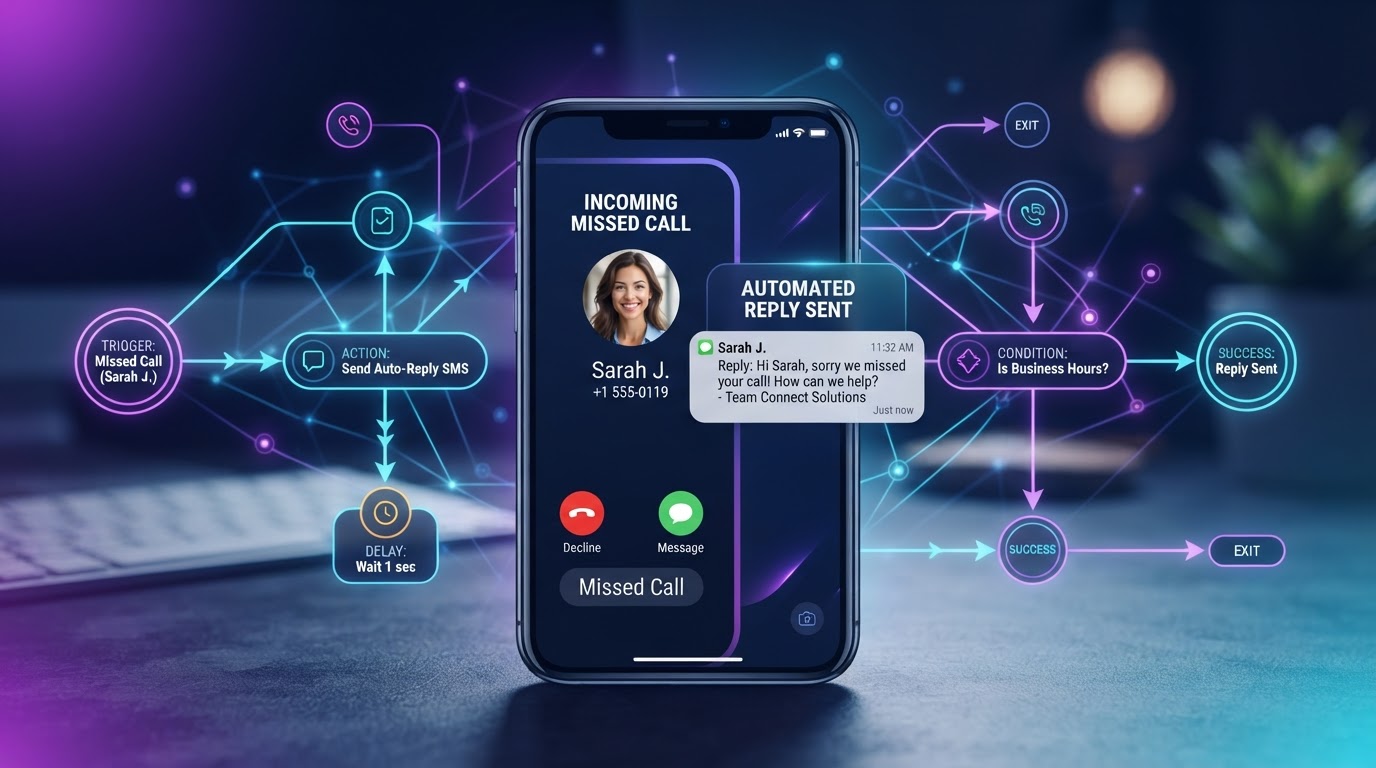
A plumber in Modesto told us he missed an average of nine calls a week — most while he was under a sink or driving between jobs — and had no idea what those calls were worth. We did the math with him. At his average job value of $650 and a conservative recovery rate, those nine weekly missed calls represented over $150,000 a year in potential revenue he was handing to the next plumber on Google. Missed-call text-back is the single fastest-deploying, highest-ROI automation we install, and it works because it interrupts a loss that is already happening. This guide covers the mechanics, what a good system includes, the mistakes that make it feel robotic, and how to measure whether it is actually recovering revenue.
01What a Missed Call Actually Costs
Service businesses miss calls constantly. A plumber under a sink, a dentist with a patient, a lawyer in court, a med spa esthetician mid-treatment — these are businesses where staff physically cannot answer every call. The assumption is that the caller will leave a voicemail or call back. They will not. Consumer calling behavior has shifted hard toward instant gratification; if a call is not answered, the caller moves on within minutes.
The math is straightforward. A business missing 10 calls a week, each representing a customer worth $300 to $500 in lifetime value, is looking at $3,000 to $5,000 a week in potentially lost revenue — $150,000 to $260,000 annually. Even recovering half of those missed calls transforms the bottom line.
The compounding effect is worse than the raw numbers. A missed call does not just lose one transaction — it loses the relationship, the referral potential, and the review the customer might have left. A caller who reaches a competitor does not just spend their first purchase there; they become that competitor's customer for years.
02The Mechanics, Step by Step
The system uses event triggers — digital tripwires. When an incoming call goes unanswered, the system detects it within seconds and fires an automated SMS to the caller's number. The whole process, from missed call to delivered text, takes 10 to 30 seconds.
Step one: a call rings unanswered or goes to voicemail after a set number of rings. The phone system or CRM logs the missed-call event, capturing the caller's number, the timestamp, and whether a voicemail was left.
Step two: the automation platform detects the missed-call event via webhook or API polling. This is the tripwire — the system recognizes a specific event occurred and triggers the response sequence.
Step three: the system sends an automated SMS, personalized with the business name and an open-ended question. For example:
Step four: the caller's response is logged in the CRM, creating a lead record with the full call and text history attached. If the caller engages, a team member follows up with full context. If they do not respond, the system can trigger a follow-up later that day. Understanding the broader lead generation and nurturing workflow shows how each trigger connects to your pipeline.
03What Separates a Good System From a Bare One
A bare-bones system sends a generic message and stops. A well-designed system does four things the bare one does not.
First, smart timing. The initial text within 30 seconds, a follow-up if no response within two hours, and a final attempt the next morning. Multi-touch dramatically increases recovery compared to a single message.
Second, full CRM logging. The missed call, the text exchange, the caller's response — all attached to a lead record so a human following up has full context. A rep calling back should know the caller texted about emergency drain cleaning at 2pm, which turns a cold callback into a warm conversation.
Third, voicemail transcription. If the caller does leave a voicemail, transcribe it with AI and include the transcript in the CRM record and the text-back response. This lets the business respond to the actual question, not just acknowledge a missed call.
Fourth, business-hours awareness. A text sent at 11pm should acknowledge the after-hours nature:
This sets expectations and prevents the impression that the business is ignoring the caller.
Stop Losing Calls to the Next Business on Google
We deploy missed-call text-back in days — with CRM logging, business-hours awareness, and a tuning loop that keeps it converting — done-for-you on a flexible monthly subscription.
04The Mistakes That Make It Feel Robotic
The number one mistake is a generic, impersonal message. 'We missed your call. Please call back.' is the automation equivalent of voicemail — it adds no value and feels robotic. A good message is conversational, acknowledges the situation, and invites a response with an open question. The tone should match your brand: a law firm's text sounds professional and reassuring; a pizza restaurant's can be casual and warm.
The second mistake is not training the AI on your business context. If the caller texts back asking about payment plans or hours, a generic chatbot fails or gives a wrong answer. The system should be trained on your FAQs, pricing page, service area, and policies so it handles common questions naturally. This is the difference between a text-back that feels like a digital employee and one that feels like a vending machine.
The third mistake is over-automating the follow-up. If the caller engages, a human should take over — not an endless AI loop. The system should detect when a conversation requires human judgment and route it immediately. The automation captures and initiates; the human closes. This hybrid model is the same principle behind effective appointment and calendar automation that pairs text-back with booking.
05Consistency Guardrails
Automated texting is not a legal free-for-all. The Telephone Consumer Protection Act and similar rules govern how businesses send automated SMS. The safest approach is transactional, one-to-one text-back — replying to a person who called you, in response to that specific call, with informational content. This is generally treated differently from marketing blasts, but the rules are nuanced and depend on your jurisdiction.
Key guardrails: include a clear opt-out mechanism, never send promotional content in the first text-back, and log consent evidence in the CRM. If you expand the sequence into marketing follow-ups, you need explicit prior express written consent. The FCC's TCPA guidance is the authoritative reference; review it with legal counsel before launching any multi-touch sequence.
Compliance also protects deliverability. Carriers filter numbers that generate complaints, and a single flagged campaign can degrade SMS delivery for your entire business. Build compliance in from day one, not as an afterthought.
06Measuring Whether It Works
A text-back system without measurement is a black box. Track these from day one:
- Total missed calls per week — your baseline before automation
- Percentage of missed calls that receive a text-back — should be 100%
- Response rate — percentage of text-backs that get a reply
- Recovery rate — percentage of recovered leads that book or purchase
- Revenue recovered — recovery rate times average customer value
A well-functioning system typically achieves a 25 to 40% response rate, meaning a quarter to two-fifths of callers who would have been permanently lost engage via text. Of those, 30 to 50% convert to booked appointments. For a business missing 10 calls a week with a $400 average customer value, recovering 3 leads a week at 35% conversion adds $420 a week — over $21,000 annually from a single automation that deploys in days. Pair these metrics with the automation ROI calculator framework to quantify total value across every workflow.
Key Takeaways
- Over 80% of callers who reach voicemail hang up without leaving a message — every missed call is a lead lost to a competitor.
- The system works via event triggers: missed call detected, automated SMS within 30 seconds, response logged in CRM, human follows up with context.
- A good system includes multi-touch follow-up, CRM logging, voicemail transcription, and business-hours-aware messaging.
- Train the AI on your business context so it answers common questions naturally — generic bots feel robotic and lose leads.
- Track response rate, recovery rate, and revenue recovered — a well-tuned system typically recovers 25–40% of missed calls.
Frequently Asked Questions

Written by Moise
Founder & Lead Automation ArchitectMoise is the founder and lead automation architect at Wootomatic. With over a decade of hands-on experience designing, implementing, and maintaining high-throughput business automations, CRM pipelines, and custom AI agents, he has architected mission-critical workflows for hundreds of appointment-based and field-service businesses. His focus is on resilient, monitored systems that produce measurable ROI without fragile software bloat.
Put This Into Practice
We build and manage these automations for service businesses on a flexible monthly subscription. Explore the related service to see how it works:


